
Warehouse & Inventory Control
Stock & Purchase Management
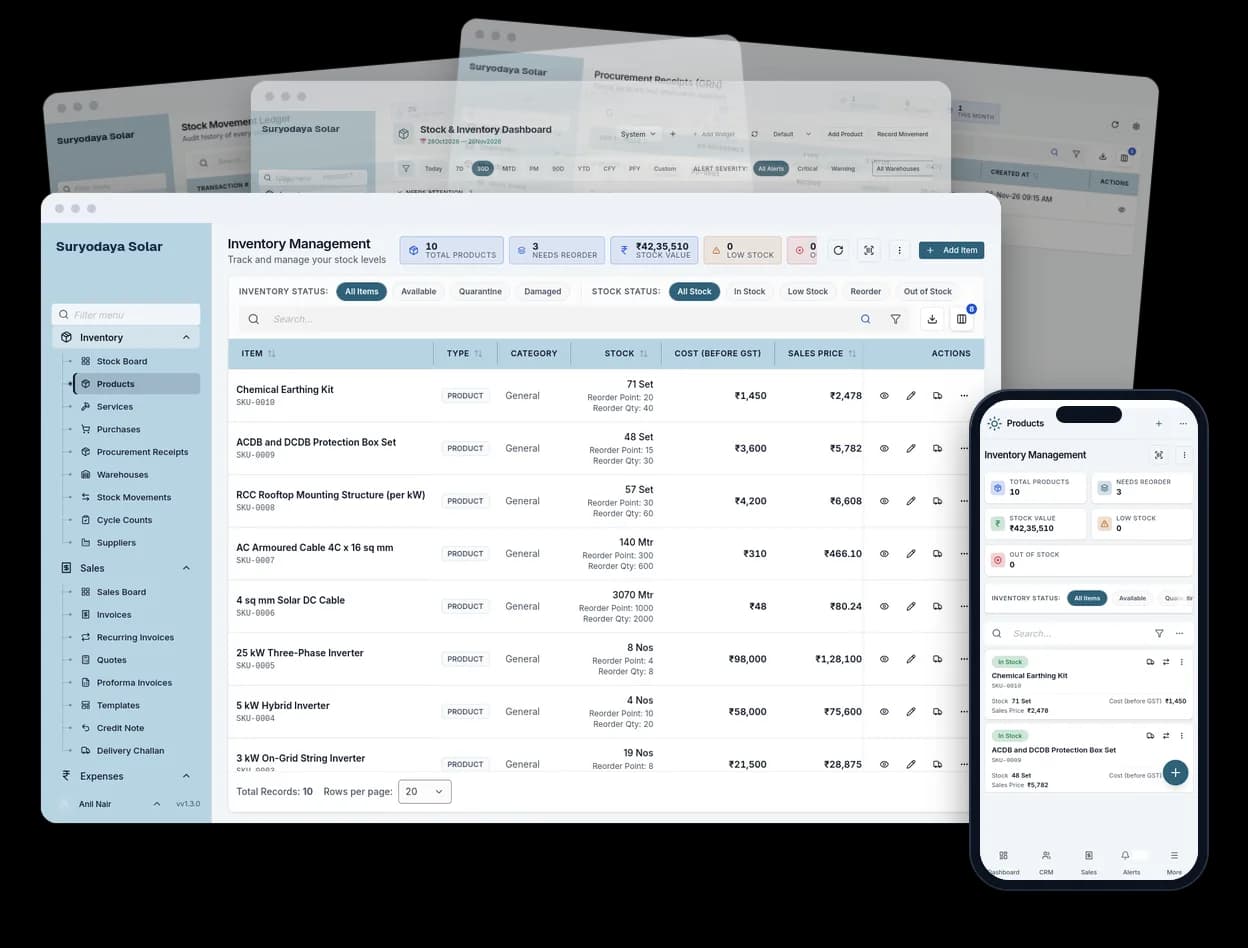
Track panels, inverters and parts across warehouses, batches and serial numbers. Every receipt, issue, transfer and adjustment is recorded.
Free 30-minute walkthrough · reply within 1 working day
01Key capabilities
What it does.
- 01Purchase order approved
- 02Goods received with batch and serial numbers
- 03Movement recorded in stock history
- 04Invoice billed and stock issued
At a glance
- Batch and serial tracking
- Multiple warehouses
- Barcode scanning
- Stock reports
- 01
Stock levels by product, warehouse, batch and serial number.
- 02
Product list with categories, and MRP, wholesale, retail and D2C prices on each product.
- 03
A movement history showing what came in, went out, moved or was adjusted, and against which document.
- 04
Batch and expiry tracking, with expired batches blocked from sale.
- 05
Cycle counts, reviewed and approved before any correction is posted.
- 06
Purchase orders, approvals, goods receipts and supplier returns.
- 07
See and filter purchase orders that are past their expected delivery date and still waiting for goods.
- 08
Raise a purchase order straight from a customer’s quote.
- 09
Move stock between warehouses in one step, or in two steps where it stays on the way until received.
- 10
Supplier records, with a credit limit warning on the purchase order screen.
- 11
Keep product certificates on the product.
- 12
Change GST for many products at once.
- 13
Low-stock list against each product’s reorder point.
- 14
Choose how stock is valued: purchase price, FIFO, LIFO or weighted average.
- 15
Barcode and serial number scanning with a phone or computer camera, or a USB or Bluetooth scanner.
- 16
Reports for stock value, ageing, dead stock, expiring batches, reorder, project material shortage and purchase ITC.
- 17
Packaged kits and assemblies, switched on in settings.
- 18
With kits switched on, order a kit as one item on a purchase order and receive its parts into stock.
- 19
Draft and build assemblies from their parts, and see how many the parts in stock allow.
- 20
A service list for installation and maintenance work, with rates and GST but no stock count. Buying these services on purchase orders is a separate setting.
- 21
An optional one-time code from the supplier to confirm a goods receipt.
What happens when stock is low?
Items at or below their reorder point appear on the low-stock list on the stock dashboard. Your purchase team raises the order from there.
Does it support more than one warehouse?
Yes. Stock is tracked per warehouse. A transfer moves it at once, or in two steps where the goods show as in transit, and cannot be sold, until they are received.
Can we trace a serial number?
Yes, for products with serial tracking switched on. Serial numbers are captured at goods receipt and scanned when an invoice is picked, so a unit can be traced from purchase to delivery.
How are stock corrections checked?
Each adjustment is written to the movement history with who made it, the quantity changed, any notes and the time. Cycle counts are also reviewed and approved before they post.
See it running on your own operations
A 30-minute walkthrough. Bring a recent quote, your stock sheet or a job that is stuck.
Free 30-minute walkthrough · reply within 1 working day