
Leads, Deals & Customers
CRM & Omni Inbox
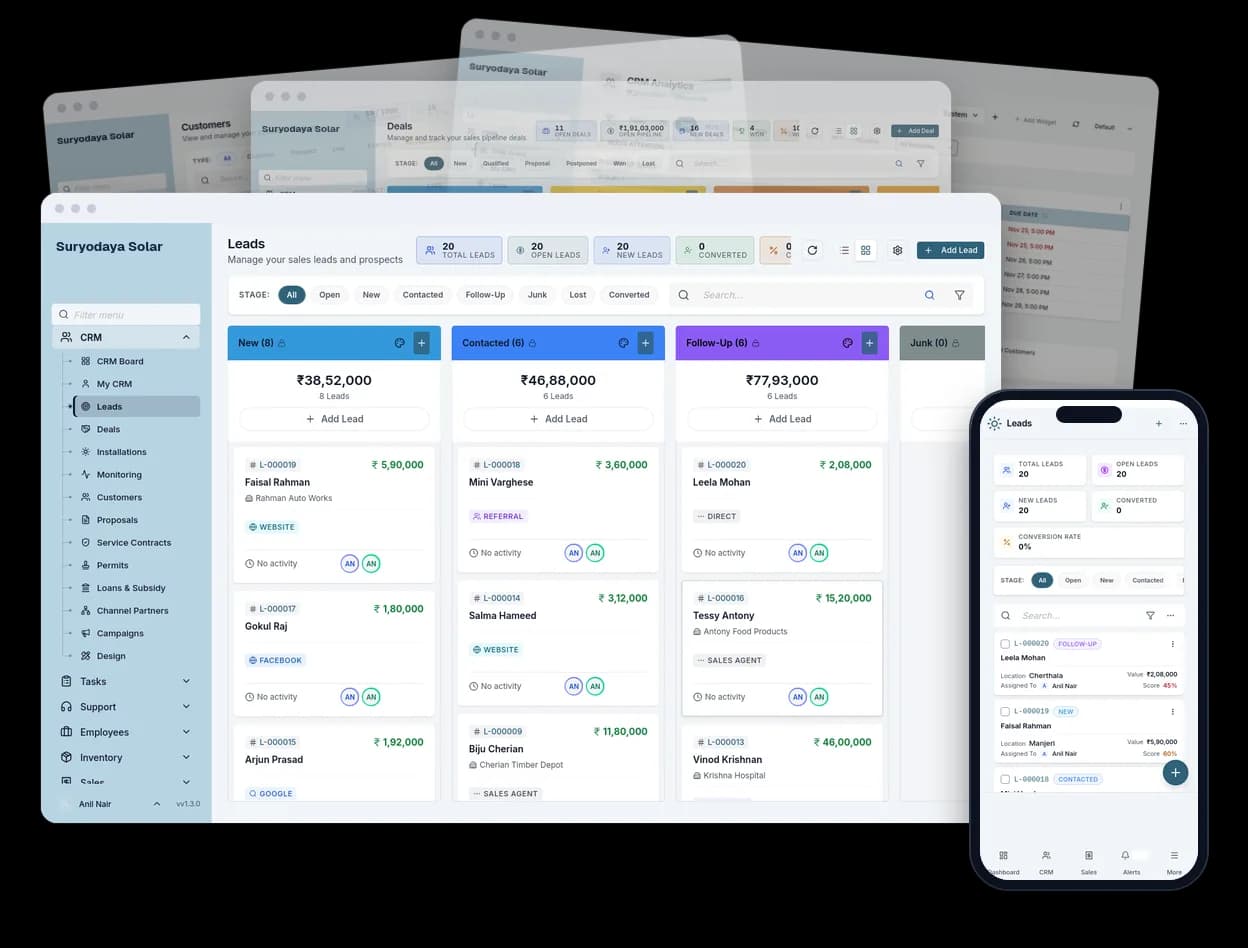
Keep every enquiry, deal and customer in one place. See who needs a follow-up today, reply to messages from one inbox, and carry the same record through to installation.
Free 30-minute walkthrough · reply within 1 working day
01Key capabilities
What it does.
- 01Lead Arrives from Web, WhatsApp, Ads or Your Team
- 02Assign It and Make the First Reply
- 03Track the Deal and Every Conversation
- 04Deal Won: Customer Record and Portal Login Created
At a glance
- List and Kanban views
- Role-based access
- Android contact sharing
- 01
Leads, deals and customers with your own stages and custom fields.
- 02
My CRM: one list of your leads, deals, proposals, permits and installations.
- 03
Turn a lead into a customer and a deal, merge duplicates, and assign or move many leads at once.
- 04
Duplicate check on exact phone number or email against leads not yet converted. Your team is stopped from adding or importing a repeat; one that arrives from a channel is saved and flagged.
- 05
A daily list of open leads with no follow-up booked and no activity for a few days (three by default) goes to the owner and their manager.
- 06
Postpone a lead or deal to a revisit date. The owner is reminded then, and evo7 can reopen it if you switch that on.
- 07
Log calls, emails and meetings with outcomes from your own list, and see logged calls beside the messages on the lead, deal or customer. Calls are made on your own phone.
- 08
Lead and deal loss reports with reasons, activity by sales person, and follow-up ageing.
- 09
When a user’s login is switched off, their open leads, open deals and customers can move to their manager or another way you choose in settings.
- 10
Round-robin lead assignment, switched on in settings.
- 11
Follow-up reminders and a timer for the first reply to a new lead.
- 12
A points score on each lead, based on rules you set, with the reasons shown.
- 13
Omni Inbox for WhatsApp, Facebook, Instagram, email, your website forms and Google Ads lead forms. Google leads come in only, and there is no SMS. Switched on in settings.
- 14
Planned: capture leads from Meta Lead Ads forms. This is not available yet.
- 15
In the Omni Inbox, snooze a chat, add an internal note, transfer it to a team and tag several chats at once.
- 16
Send one message to many contacts as a broadcast. It has its own permission.
- 17
WhatsApp or email a person straight from their lead, deal or customer page.
- 18
On Android, add evo7 to your home screen, then share a contact from your phone into a new lead, customer or WhatsApp message.
- 19
Send a secure link so a customer can upload PAN, bank statements and other papers after a one-time code. Switched on in settings.
- 20
Weighted pipeline report from the value and chance of winning you enter on each deal.
- 21
Referral codes show who sent each customer, with a reward you decide.
- 22
Warranty products recorded against the customer and the deal.
- 23
Service contracts: agreements with a supplier or your own service team for one installation. Activate, amend, renew or terminate them.
- 24
An audit trail tab on lead, deal and customer records.
02The problem
Enquiries get lost between phones.
A rooftop enquiry can arrive on WhatsApp, by email, from your website or from an advert. When each one sits on a different phone, nobody can tell who replied or what was promised.
The CRM keeps the enquiry, the conversation and the next step on one record, so anyone covering for a colleague can pick it up.
03A day with it
From first reply to forecast.
- Sales Agent
Opens My CRM and works through the follow-ups that are due.
- Sales Agent
Replies to a WhatsApp question from the inbox, then logs the phone call that followed and books the next step.
- Sales Agent
Records the site survey on the deal and creates the follow-up task from it.
- Sales Manager
Opens the pipeline report, then reads why lost deals were lost.
- Admin
Adjusts the scoring rules when a new source starts bringing better leads.
04Who uses it
Who sits where.
Sales Agent
Works their own leads and deals, and builds proposals from them.
Sales Manager
Sees the team’s pipeline and reports, and publishes quotes.
Operations Manager
Picks up leads, installations, permits and service contracts.
Admin
Sets up scoring, referral rewards and who gets new leads.
Can we add our own fields?
Yes. You can add custom fields for the details your business needs to record.
How is the lead score worked out?
You set the points. Contact details, company, deal value, lead source and recent activity can all count. Each lead shows how its score was reached.
Which channels reach the Omni Inbox?
WhatsApp, Facebook, Instagram, email, website forms and Google Ads lead forms. You can receive Google leads but cannot reply through Google. Each channel needs to be connected first.
Does the CRM work with our email?
Yes. Connect a mailbox and switch it on for the inbox. Emails link to the matching lead or customer, and a message from someone new creates a lead.
How are service contracts different from customer AMC?
A service contract here records who will do service work on an installation, such as a subcontractor, and on what terms. It does not post anything to billing. Customer AMC visits are handled under Support.
What happens when we mark a deal as won?
The lead becomes a full customer record, and a customer portal login is created when there is an email address. evo7 asks you to confirm first, because a won deal cannot be moved back.
Can we filter the lead list?
Yes. You can filter by tags, stage, status, source, value, score and the person assigned.
See it running on your own operations
A 30-minute walkthrough. Bring a recent quote, your stock sheet or a job that is stuck.
Free 30-minute walkthrough · reply within 1 working day